In setting up this website i had to update a few DNS entry in my hosting platform. Below is a small write up of what is dns, what types of records exist and how to validate them using linux commands such as dig and nslookup
What is DNS
DNS - Domain Name System which is used to translate domain name (e.g. www.google.com) to its IP (Internet Protocol) address which computers can understand.
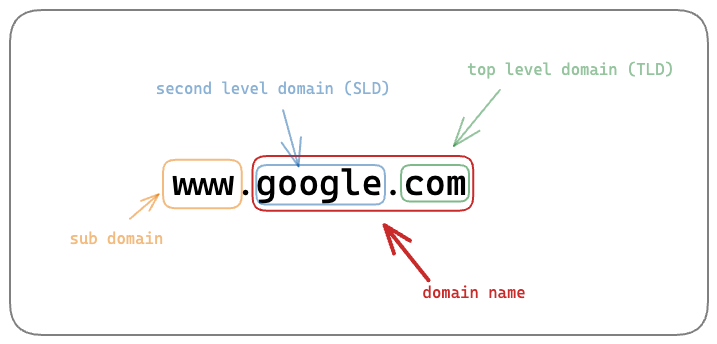
Parts of a URL
Its good to understand part of domain especially for CNAME DNS record type
The diagram does not contain protocol e.g.
https
- Looking at www.google.com
- google.com is domain name
- www is the sub domain
- com is the top level domain
- google is the second level domain
Types of DNS records
There are different types of DNS record
| Details | DNS record type | Example | Points To |
|---|---|---|---|
| Address record Resolves to an IPV4 address (i.e. 32 bits) | A | google.com | 142.251.41.46 |
| Address record Similar to A record but resolves to IPV6 address (i.e. 128 bit alphanumeric) | AAAA | google.com | 2607:f8b0:400b:80f::200e |
| Canonical Name An alias for pointing a sub domain to its main domain name. See Parts of a URL above to understand about subdomain | CNAME | www.google.com | google.com |
| Main Exchange record Used for emails. The record points to the server where email should be delivered | MX | gmail.com | gmail-smtp-in.l.google.com |
| Start of authority Specifies the name of the server responsible for managing the DNS records for a particular domain | SOA | google.com | dns-admin.google.com |
| Name Server indicates the authoritative name servers for a domain or subdomain | NS | google.com | ns1.google.com |
Service Record points to a server and service and includes port number. In this 993 is the port number | SRV | _imaps._tcp.gmail.com | 5 0 993 imap.gmail.com |
| Pointer Record reverse of A or AAAA record. Also know as reverse DNS record. Used to detect if an email is authentic or spam | PTR | 8.8.8.8 | dns.google |
| Miscellaneous Information used for Email span prevention and Domain ownership verification | TXT | google.com | “google-site-verification=wD8N7i1JTNTkezJ49swvWW48f8_9xveREV4oB-0Hf5o” |
Each record comes with TTL means time to live the amount of seconds to be cached before it needs to be refreshed from the authoritative DNS server.
Verify DNS entry
dig
dig is DNS lookup utility for Unix/Linux (sorry windows please use nslookup or use WSL).
To check if you have dig installed you can run
command -v dig
To install dig in linux (debian)
apt-get install dnsutils
dig is available on mac.
Basic dig commands
- With no option we get only A records
dig google.com
Look at the ANSWER SECTION the A record is 142.251.41.78
; <<>> DiG 9.10.6 <<>> google.com
;; global options: +cmd
;; Got answer:
;; ->>HEADER<<- opcode: QUERY, status: NOERROR, id: 4003
;; flags: qr rd ra; QUERY: 1, ANSWER: 1, AUTHORITY: 0, ADDITIONAL: 1

;; OPT PSEUDOSECTION:
; EDNS: version: 0, flags:; udp: 1232
;; QUESTION SECTION:
;google.com.			IN	A

;; ANSWER SECTION:
google.com.		575	IN	A	142.251.41.78

;; Query time: 8 msec
;; SERVER: 192.168.86.1#53(192.168.86.1)
;; WHEN: Sat Dec 28 10:52:56 EST 2024
;; MSG SIZE  rcvd: 55
- To only get the A record info. Useful for scripting.
dig +short google.com
Output
142.251.41.78
- To look at a specific record e.g. AAAA record
dig google.com AAAA
- To see all record
dig google.com ANY
- To use a specific dns instance e.g. using
8.8.8.8is google dns
dig @8.8.8.8 google.com
- Reverse lookup for PTR (pointer record) below is the ip of gmail.com
dig -x 142.251.41.69
- To trace all the lookup done
dig google.com +trace
nslookup
Is also a command-line tool used to query domain names and resolve them to IP addresses
- Basic usage with just hostname.
nslookup google.com
Output is below. Non-authoritative answer means the DNS server that provided the output is not responsible but knew the answer.
Server:		192.168.86.1
Address:	192.168.86.1#53

Non-authoritative answer:
Name:	google.com
Address: 142.251.41.78
- To get a specific type of record
nslookup -type=AAAA google.com
- To use a different dns server e.g. google
8.8.8.8
nslookup google.com 8.8.8.8
Online GUI based tools
If you prefer a GUI based tool following sites can be used